
Project Alternatives in Logic Pro X
If you are looking to A/B test a mix or you want the ability to go back to an older or newer version of a track then Logic's Project Alternatives are your answer. What is a…
If you are looking to A/B test a mix or you want the ability to go back to an older or newer version of a track then Logic’s Project Alternatives are your answer.
What is a Project Alternative?
A project alternative is a snapshot of a project that is saved inside the same project folder. It allows you to explore different arrangements, mixes, and set-up variations without having to load up a new project each time.
How Do I use Project Alternatives?
The way that you use project alternatives can vary depending on what you are looking to get out of them.
A/B Your Mix
If you are working on a mix of your track but you want to try a different approach then you can save a project alternative to start work on that different mix.
You can then quickly A/B the mixes by switching between the project alternatives.
Explore Different Arrangements
Sometimes when you are writing a piece of music you want to explore a different arrangement or structure.
You can save a project alternative for each variation/arrangement that will allow you to quickly and easily explore these musical options and compare the results.
Keep Old/New Versions
This is how I use project alternatives the most.
When I am working on a track for a publisher, each time I complete a version I save it as a project alternative before I send it off for feedback.
This means that if the publisher or client ever requests an older version I then have it saved as a project alternative within my project folder.
How to Create A Project Alternative
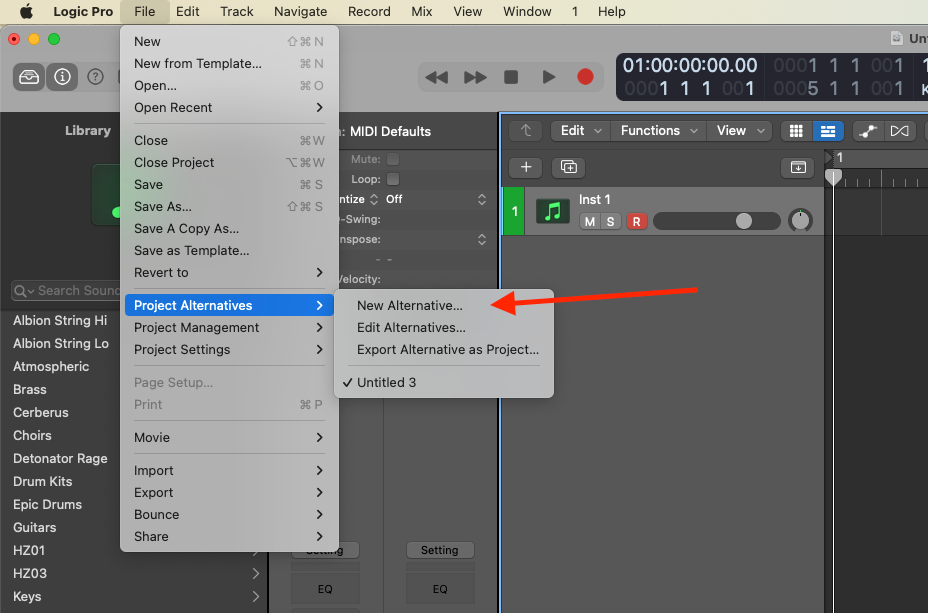
- In Logic Pro, choose File > Project Alternatives > New Alternative.
- Give the alternative an appropriate name
Once you have created your alternatives, you can then go back into File > Project Alternatives to use/edit/delete any alternatives you want.
Happy Producing!

Happy composing!Rich
Read next
- Auto Colour Tracks in Logic
Do you want to make your Logic Pro session easier to navigate and at the same time make it look like an artist's paint palette? Then you need 'Auto-assign track colours'! Let me show you...
- How to Send a Logic Pro X Project
I frequently need to send Logic projects to other composers for collaborations and for recording sessions when I record with an orchestra. It is very simple to do, you just have…
- How to Create a Click Track In Logic Pro X
Sometimes you need to have the click created as a track in logic so that you can share the printed audio file with other producers. Let me show you how to do this.
- How to Colour Markers in Logic Pro X
When creating an arrangement of a piece of music or a song it is really important to be able to quickly and easily navigate around the individual sections. That is where coloured markers can come in handy.