
Templates in Logic; How to Save, Install and Delete Them
I use templates for new projects and albums that I am working on. They help me keep each track sounding like it is from the same sound world. Templates are also a great way to…

I use templates for new projects and albums that I am working on. They help me keep each track sounding like it is from the same sound world. Templates are also a great way to save time by not having to load up all the instruments in every new project.
How Do I Save a Logic Template?
Load up a new session in Logic and add all the things you want in that session; instruments, routing, channels etc. Then click:
File > Save As Template
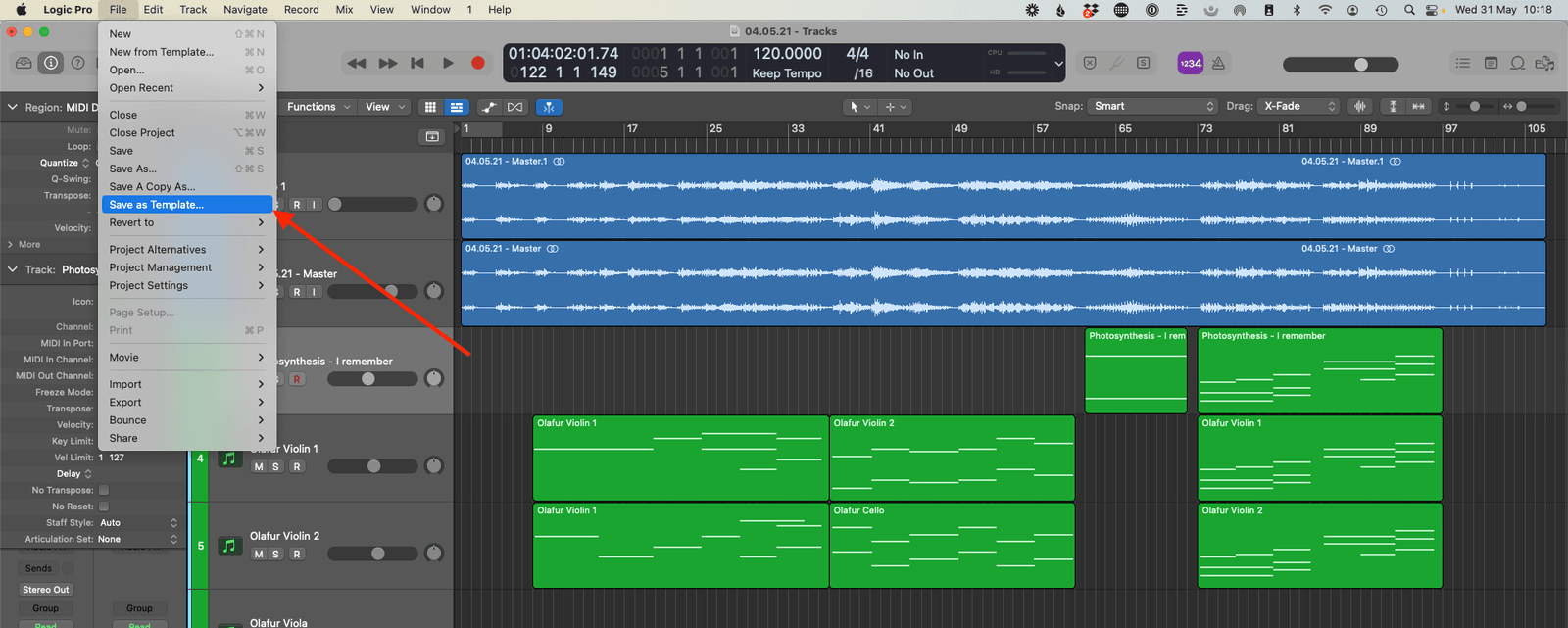
You can then name the template as you wish.
Where Are They Stored?
This is the important part. Once you know where they are stored you can then install and delete them.
All the custom Logic Pro templates are stored in a folder in the “Audio Music Apps” folder.
[User] > Music > Audio Music Apps > Project Templates

How Do I Install a Template in Logic Pro?
To install a template in Logic Pro it is simply a matter of locating the “Project Templates” folder and dragging in the template you want to install.
How to Delete Logic Pro X Templates
The only problem is that the templates start to add up after a while. Before you know it you have so many it is hard to remember which one you are using, especially when you use names like “orchestral template” and “orchestral template 1” etc.
So once in a while, it is a good idea to delete your custom templates and only keep the most relevant to your current work.
To delete a template in Logic Pro X navigate to the folder they are stored and move the unwanted templates to the trash.
- Navigate to the “Project Templates” folder (see above)
- Right-click on the template you want to delete
- Select “Move to Trash” (or drag it to the trash)

Happy composing!Rich
Read next
- Auto Colour Tracks in Logic
Do you want to make your Logic Pro session easier to navigate and at the same time make it look like an artist's paint palette? Then you need 'Auto-assign track colours'! Let me show you...
- How to Send a Logic Pro X Project
I frequently need to send Logic projects to other composers for collaborations and for recording sessions when I record with an orchestra. It is very simple to do, you just have…
- How to Create a Click Track In Logic Pro X
Sometimes you need to have the click created as a track in logic so that you can share the printed audio file with other producers. Let me show you how to do this.
- How to Colour Markers in Logic Pro X
When creating an arrangement of a piece of music or a song it is really important to be able to quickly and easily navigate around the individual sections. That is where coloured markers can come in handy.