
How to Freeze Tracks in Logic Pro X
So you are running low on CPU and you need to free up some memory? In this post, I am going to show you how to freeze tracks in Logic Pro X. Unless you have previously enabled it,…

So you are running low on CPU and you need to free up some memory? In this post, I am going to show you how to freeze tracks in Logic Pro X.
Unless you have previously enabled it, you will need to enable Freeze in your channel strip settings.
Right-click on any channel strip to reveal the track menu.
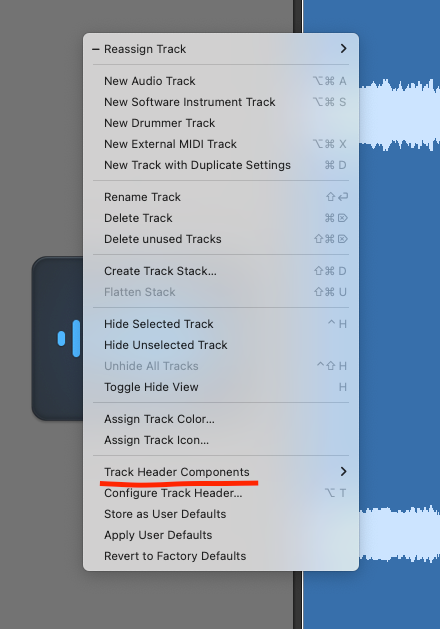
Go to ‘Track Header Components’ and select ‘Freeze’.
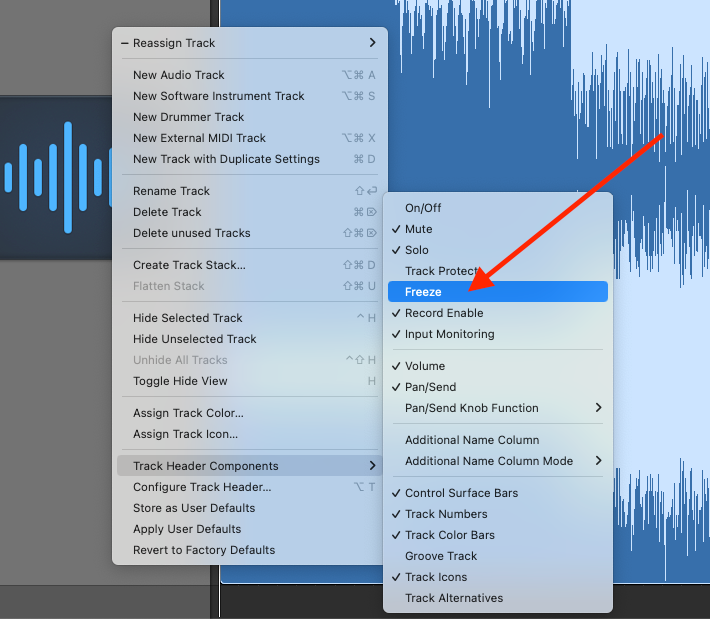
The ‘Freeze’ icon will then be added to your track headers.

If you click on the ‘Freeze’ button, it will turn green and the ‘Record’ button will disappear.

The next time you press play you will see the playhead skim across the session regions to the end of the project. That track is now being “frozen”.
What does freezing tracks do in Logic Pro and does it save CPU?
Freezing the track in Logic renders the track(s) and disables all plugins associated with those tracks. It also means that if you want to edit that track in any way you will have to unfreeze it.

Happy composing!Rich
Read next
- Auto Colour Tracks in Logic
Do you want to make your Logic Pro session easier to navigate and at the same time make it look like an artist's paint palette? Then you need 'Auto-assign track colours'! Let me show you...
- How to Send a Logic Pro X Project
I frequently need to send Logic projects to other composers for collaborations and for recording sessions when I record with an orchestra. It is very simple to do, you just have…
- How to Create a Click Track In Logic Pro X
Sometimes you need to have the click created as a track in logic so that you can share the printed audio file with other producers. Let me show you how to do this.
- How to Colour Markers in Logic Pro X
When creating an arrangement of a piece of music or a song it is really important to be able to quickly and easily navigate around the individual sections. That is where coloured markers can come in handy.