
How to Bounce Tracks in Logic Pro X
If you want to send an audio file of your Logic session or part of your session, then you will need to bounce the tracks into a single audio file. How to Bounce You Mix If you…

If you want to send an audio file of your Logic session or part of your session, then you will need to bounce the tracks into a single audio file.
How to Bounce You Mix
If you want to send your whole mix then you will need to bounce the whole project.
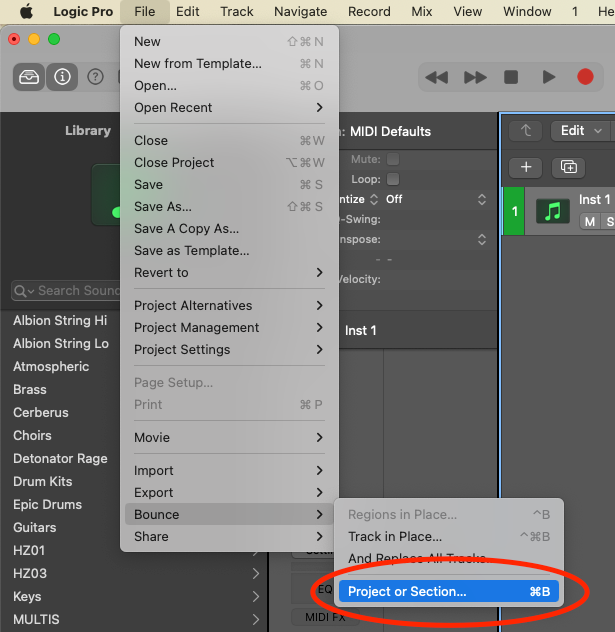
To do that go to File > Bounce > Project or Section (cmd+B)
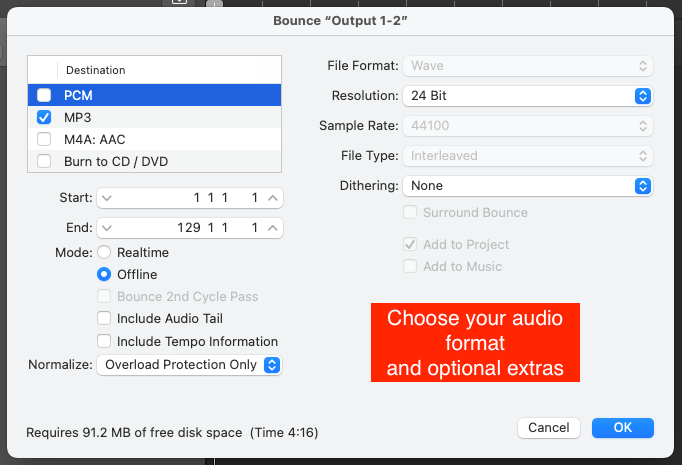
You will then be given the option to bounce your “Output 1-2” into the audio format of your choice (PCM, MP3, M4A, Burn to CD/DVD).
You can then choose some optional extras including the audio tail, Normalize, and the exact format you want your audio in.
How to Bounce Individual Tracks in Logic Pro X
To bounce individual tracks:
- Solo the tracks you want to bounce
- go to File > Bounce > Project or Section (cmd+B)
- Choose the format you want those tracks to be bounced
What is The Difference Between Bounce and Export in Logic?
This is a really common question and understandably because from the outlook they do the same thing.
Both bouncing and exporting can create and save an audio file of either your whole mix or a section of the mix.
Bouncing will refer to the whole project; sends and busses included. Exporting will on the other hand only refer to the individual channels/tracks.
I approach it like this; if I want to send a project mix then I will bounce, if I want to send individual audio files then I will export.
Happy Producing!

Happy composing!Rich
Read next
- Auto Colour Tracks in Logic
Do you want to make your Logic Pro session easier to navigate and at the same time make it look like an artist's paint palette? Then you need 'Auto-assign track colours'! Let me show you...
- How to Send a Logic Pro X Project
I frequently need to send Logic projects to other composers for collaborations and for recording sessions when I record with an orchestra. It is very simple to do, you just have…
- How to Create a Click Track In Logic Pro X
Sometimes you need to have the click created as a track in logic so that you can share the printed audio file with other producers. Let me show you how to do this.
- How to Colour Markers in Logic Pro X
When creating an arrangement of a piece of music or a song it is really important to be able to quickly and easily navigate around the individual sections. That is where coloured markers can come in handy.