
How To Duplicate Tracks In Logic Pro X
In this post I show you how to duplicate tracks in Logic Pro X. It’s super easy. Why would you even want to duplicate your tracks? This is a really useful question as it reflects…
In this post I show you how to duplicate tracks in Logic Pro X. It’s super easy.
Why would you even want to duplicate your tracks?
This is a really useful question as it reflects the importance of workflow in your DAW.
Duplicating tracks is a massive time saver. It stops you having to copy effect chains, bus routing, automation information, effects parameters etc.
All of these things take time and that is our most precious resource.
The other side of this is that using our time to do small but laborious tasks quickly drains us of our creative energy. This energy is vital for us to create quickly and easily.
That’s why we learn shortcuts like this.
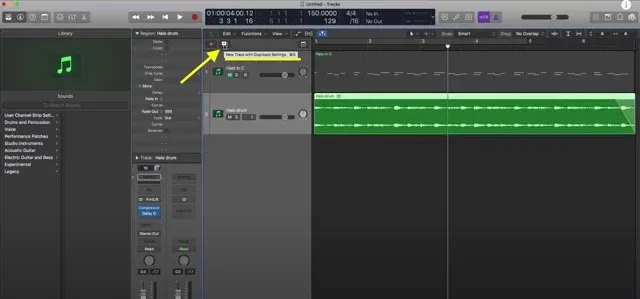
Duplicate tracks using a button
Once you have created a track that you are happy with and would like to duplicate it is simply a case of clicking on a single button and that will create a new track with duplicate settings.
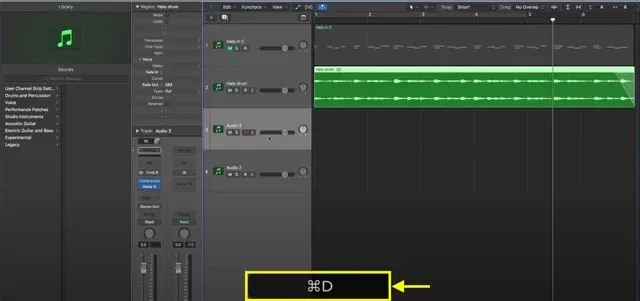
Duplicate tracks using hotkeys
Again, once you have a track you want to duplicate simply press ‘CMD‘ + ‘D‘. This will create a new track with duplicate settings.
There you have it.
Two quick and easy ways to duplicate tracks in Logic Pro X. If you found this useful then you might like these other short Logic tutorials:
Change the pitch of your audio file
Fade out in Logic Pro X (You might also be curious about what a crossfade actually is too)


Happy composing!Rich
Read next
- Auto Colour Tracks in Logic
Do you want to make your Logic Pro session easier to navigate and at the same time make it look like an artist's paint palette? Then you need 'Auto-assign track colours'! Let me show you...
- How to Send a Logic Pro X Project
I frequently need to send Logic projects to other composers for collaborations and for recording sessions when I record with an orchestra. It is very simple to do, you just have…
- How to Create a Click Track In Logic Pro X
Sometimes you need to have the click created as a track in logic so that you can share the printed audio file with other producers. Let me show you how to do this.
- How to Colour Markers in Logic Pro X
When creating an arrangement of a piece of music or a song it is really important to be able to quickly and easily navigate around the individual sections. That is where coloured markers can come in handy.