
How to Change Pitch in Logic Pro X
In this post, I show you how to change pitch in Logic Pro X. The first thing I want to highlight to you is that we are changing the pitch of an audio file NOT a midi file. Without…
In this post, I show you how to change pitch in Logic Pro X.
The first thing I want to highlight to you is that we are changing the pitch of an audio file NOT a midi file.
Without further ado, here are the steps you need to take to change the pitch.
Change the Pitch Of An Audio File In Logic Pro X
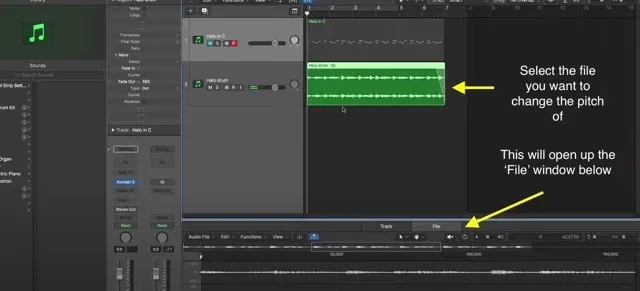
Select the file you want to edit and open up the ‘File‘ window by pressing ‘W‘
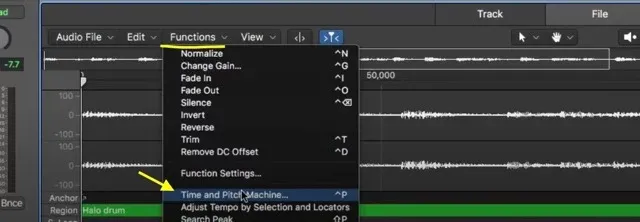
In the file window select ‘Functions‘ and in the drop-down menu select ‘Time and Pitch Machine’
Under the ‘Pitch‘ section below where it says ‘Destination‘ select how many cents up or down you want to transpose the audio file.
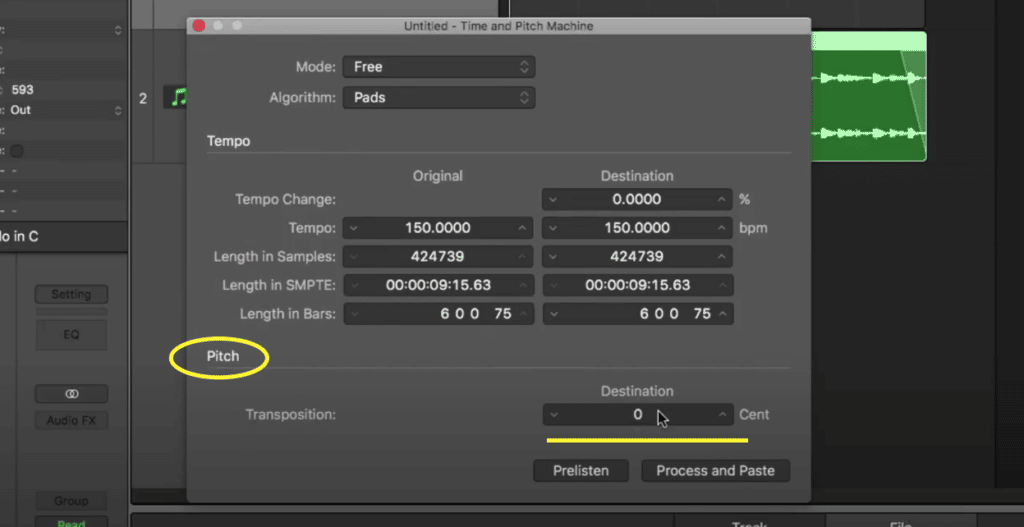
If you are unsure as to how many cents to put in then you can follow this little table to help you out.
How many Cents in Semitones
| Semitones | Interval | Cents |
| 1 semitone | Minor second | 100 |
| 2 semitone | Major second | 200 |
| 3 semitone | Minor third | 300 |
| 4 semitone | Major third | 400 |
| 5 semitone | Perfect fourth | 500 |
| 6 semitone | Tritone/diminished fifth | 600 |
| 7 semitone | Perfect fifth | 700 |
| 8 semitone | Minor sixth | 800 |
| 9 semitone | Major sixth | 900 |
| 10 semitone | Minor seventh | 1000 |
| 11 semitone | Major seventh | 1100 |
| 12 semitone | Octave | 1200 |
This table will help you to understand how much you need to transpose in the time and pitch machine to get the desired pitch change.
I have also created a tutorial if you are looking to pitch bend your MIDI and fade out your files.

Happy composing!Rich
Read next
- Auto Colour Tracks in Logic
Do you want to make your Logic Pro session easier to navigate and at the same time make it look like an artist's paint palette? Then you need 'Auto-assign track colours'! Let me show you...
- How to Send a Logic Pro X Project
I frequently need to send Logic projects to other composers for collaborations and for recording sessions when I record with an orchestra. It is very simple to do, you just have…
- How to Create a Click Track In Logic Pro X
Sometimes you need to have the click created as a track in logic so that you can share the printed audio file with other producers. Let me show you how to do this.
- How to Colour Markers in Logic Pro X
When creating an arrangement of a piece of music or a song it is really important to be able to quickly and easily navigate around the individual sections. That is where coloured markers can come in handy.